


Building an AI-Driven Product Management Operations System in Cursor
meta:
artifact: Agentic AI Ops System
status: archived
build: internal tooling
env: LearnDash • Q3 2025 • vNext.experimental
mission: streamline workflow + cross-team comms
impact: [consistent triage, better insights, stronger QA, ~50% PM efficiency]
stack: [Cursor, GitHub, Jira, Help Scout]
Explain the Meta Data
 Explain the Meta Data
This artifact covers the internal AI product-management system I originally built to speed up my own workflow, then expanded to support marketing, customer experience, and engineering. The project is archived due to restructuring, but the architecture can be reproduced anywhere.
How it was built: The system lived inside Cursor as a lightweight “operating system” wired into Jira, GitHub, and Help Scout. Around ten purpose-built agents shared the same resource files and platform integrations, handling everything from strategy shaping to triage.
Goal: The goal was simple and slightly unhinged: clone my brain so I could move faster. Once that worked, I extended it to cross-functional needs. CX got automated insight and QA reports; marketing got tools that made campaigns smarter and more consistent.
Impact: The system produced full triage flows, cross-functional reporting, and cut my time from idea to strategy + PRD by roughly 50%.
The Challenge: Navigating Rapid Change, High Stakes
This system wasn’t conceived for novelty — it was built for survival.
“Ops” was born out of the LearnDash 5.0 pivot — a moment when everything needed to move faster, but the process couldn’t keep up.
The roadmap took a hard right. Dependencies were tight, high-stakes, and scattered across teams. Communication loops kept collapsing under the weight of context switching and overly technical concepts. I was managing simultaneous engineering calls, internal documentation and enablement, customer and integration-partner readiness, and stakeholder alignment — and every minute of my time was precious.
I needed a way to rebuild my workflow mid-disruption — something that could stabilize operations, surface clarity, and keep the roadmap alive as it evolved. That need led to an AI-driven product operations system: a lightweight structure designed to take on the tedious pieces while I did the thinking.
The Build
In Cursor, I designed a lightweight AI operations system — part workflow engine, part thinking partner.
The system didn’t replace human thinking, it extended it. Each agent was trained specifically to work in the right way for our team and standards.
For example, the Engineering Advisor always referenced the contribution.md file and custom instructions from the lead LearnDash engineer before answering me at any given time.
It didn’t automate decisions — it framed them. The structure combined prompt templates, API-assisted automations, and natural-language scripting — all woven together to keep information flowing more efficiently while still keeping a human – me – in the loop. The result felt less like a bot and more like a sidekick
The final prototype structure looked a little like this:
/ops
├── handler.py           # Dispatch, routing, guardrails
├── agents/
│   ├── triage_agent     # Ticket completeness + coaching
│   ├── engineering_advisor # Code-aware analysis, feasibility
│   └── ticket_manager   # Safe Jira CRUD, preview/confirm
├── docs/                # Process templates, naming, briefs
├── registry/            # Reusable prompts, rubrics, labels
├── platforms/           # Jira • GitHub • Help Scout adapters
├── shared/              # Formatting, validation, auth utils
├── deliverables/        # Reports, comments, release notes
└── logs/                # Read-only traces, cost tracking
Design Principles
This prototype was an evolving project. I learned as I went, but I did have a few key principles I wanted to include up front. These became the core design rules — simple enough to follow, strong enough to scale.
Teaching by default.
The system should guide and inform, not replace human thinking.Context at every step.
Each output should understand why it exists — not just what it is.Human in the loop.
AI could summarize, suggest, and surface — but decisions would stay human.Lightweight by design.
If a solution added friction, it wasn’t the solution.
Outcome
The impact was subtle but powerful:
- Fewer pings, more strategic conversations.
- Routine reports auto-generated in seconds.
- Customer insights were powerful and instantly available.
- Communications improved without more meetings.
- Developers were able to work on tickets quicker.
- Support agents started writing better bug tickets.
- Technical feasibility conversations with Engineering took only minutes.
Within weeks, the experiment saved several hours per day — personal gains that compounded across the team. More importantly, it proved a concept I’d been chasing: that AI in product management isn’t about automation — it’s about amplification.
This build became the foundation for how I now think about human-AI systems: lightweight, contextual, and unmistakably human in intent.
Use Case: Automated Triage with Dual Agent Coordination
By the time I started at LearnDash, our Jira backlog had become a white-noise party nobody RSVP’d to. Support tickets lingered half-finished, engineers spent hours decoding them, and sprint planning turned into Slack archaeology.
That is why I built the Agentic Triage Workflow — a dual-agent system that coached Support on writing dev-ready bug reports and equipped Engineering with code-aware context. It was designed to teach, not just automate.
How it works:
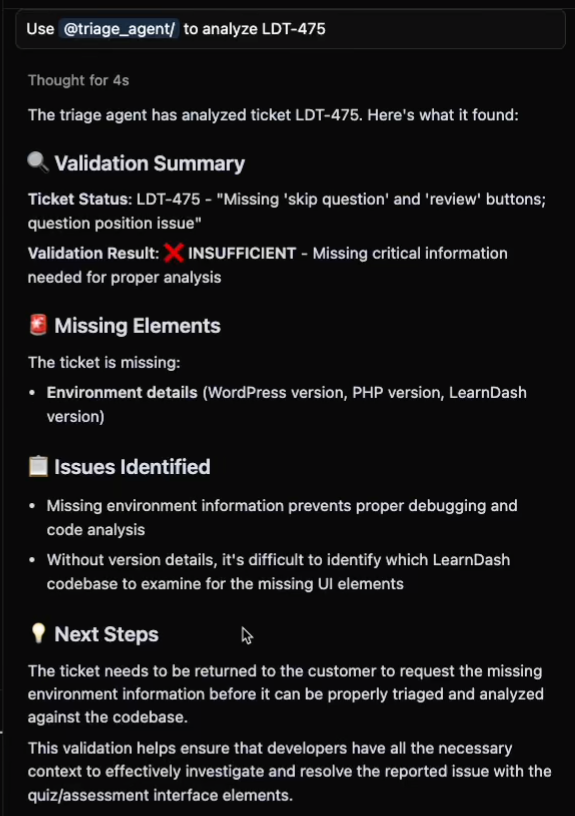
- Triage Agent checks bug ticket template compliance — like a friendly editor flagging missing details and showing how to fix them.
- Engineering Advisor runs a technical feasibility review — scanning related code, identifying affected files, and generating guidance to speed up developer onboarding.
Together, they form a built-in quality-control loop: the Triage Agent ensures completeness, the Engineering Advisor ensures accuracy. Domain awareness is embedded at every step, so the output isn’t just correct — it’s actionable.
Agentic Flow:
Triage Agent
New Bug → Jira Ticket → Read Ticket → [Filter: Template Compliance] → Sufficient? Y/N
Engineering Advisor
Sufficient Ticket → Read Ticket → [Filter: LearnDash contribution.md + custom context] → Reference GitHub repo → Output: Developer Guidance
Lessons Learned:
- Tone matters: coaching outperforms criticism.
- Train to trust: read-only mode built credibility before automation.
- Start simple: micro-feedback compounds fast.
Use Case: Managing Jira through Conversation
Managing Jira by hand was tedious and error-prone. Valuable insights from QA and triage often died in conversation or forgotten spreadsheets because creating tickets took too long.
The Ticket Manager agent solved that. It turned natural language into structured Jira actions — safely, transparently, and always with human approval.
With this agent, I could simply type commands like:
“Create tickets for post-DQA follow-ups.”
“Add notes to all accessibility items.”
“Convert these insights into Jira tasks.”
Or, I could upload a .csv file with QA or DQA line items and create tickets in bulk.
Each request flowed through one transparent layer: the agent surfaced its plan, confirmed it, and then updated Jira.
The result: less manual work, more time for higher priority tasks.
Use Case: Translating Bug Trends into Strategy
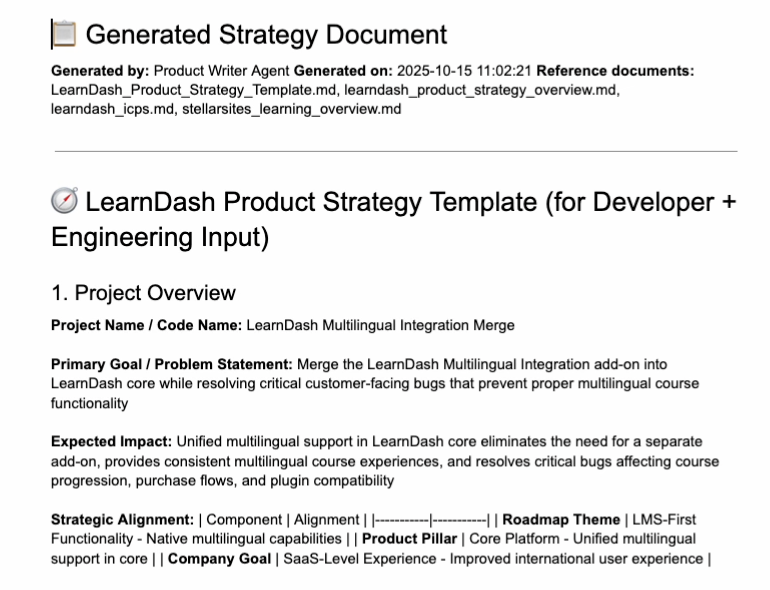
During early testing, the triage workflow surfaced a recurring issue in a LearnDash add-on. That single signal evolved into a full product strategy — merging the add-on into core. The change reduced technical debt and created new value for customers.
Prompt Flow
Triage Workflow → User ↔ Engineering Advisor Chat (Brainstorm) → Feasibility Report → Engineering Advisor Chat (Refinement) → Strategy Doc
The generated strategy document became the basis for discussion with the Lead Engineer and Engineering Manager. After one short conversation, the work was approved for the next sprint — and the merge was nearly complete by the time of my departure.
Use Case: AI Diagnostics for Support Escalation
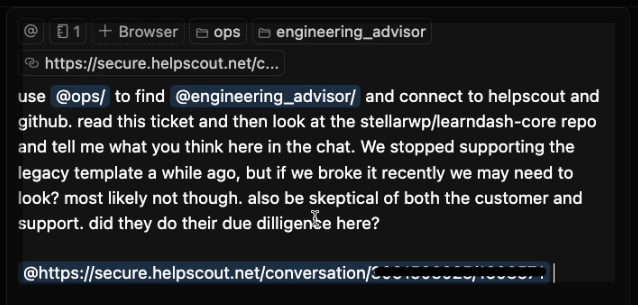
I also started to set up the Ops System to investigate customer questions from support team members. This is example is about a deprecated LearnDash feature.
The diagnostic agent retrieves context from documentation and code, explains its reasoning, and validates the source before answering — cutting time to resolution and improving trust.
Prompt Input:
Teaching:
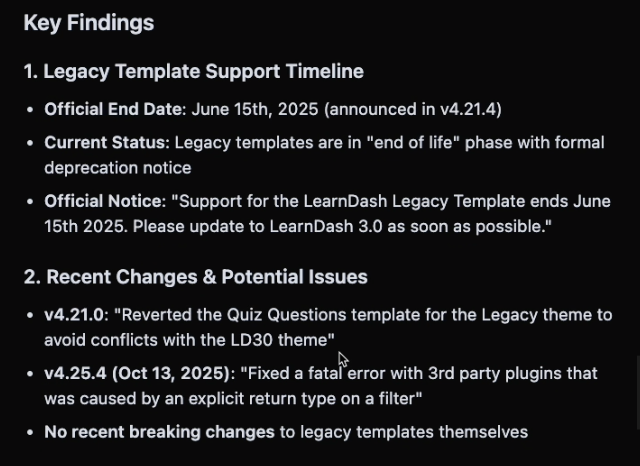
Before answering, the agent follows its custom instructions — explaining its logic and showing where each piece of information was found.
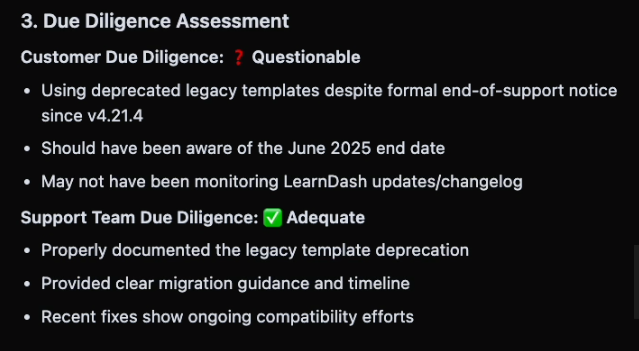
Output:
The agent verified the team’s answer: the feature the customer reported was deprecated and no longer supported.